
Top 5 Multi Port Tablet Stand
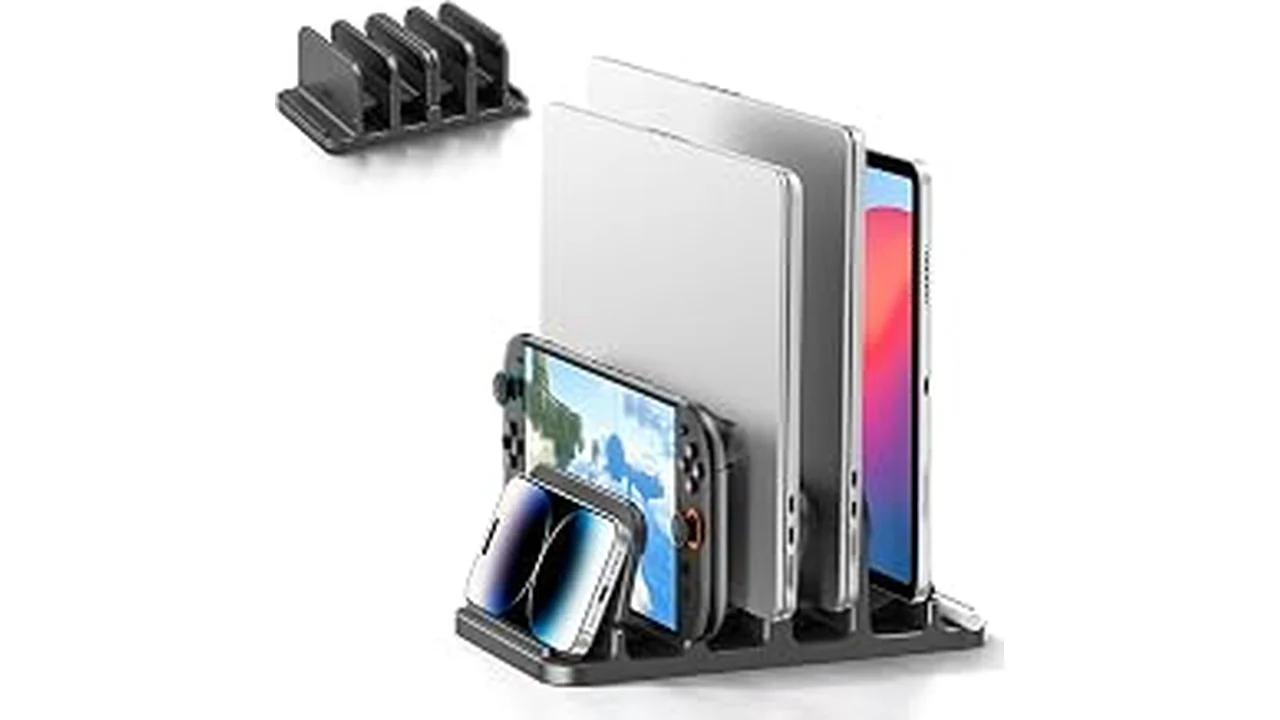
Multi port tablet stand transforms your workspace with seamless device management
This review highlights key features to consider. Stability, port accessibility, and build quality define a great multi port tablet stand.
Recommended Products
Detailed Multi Port Tablet Stand Reviews
Each of these multi port tablet stand models has been carefully evaluated based on specifications, user feedback, and value proposition. Here are the detailed reviews:
1. 300W 8-Port Fast Charging Station

Key Features That Stand Out
The 300W 8-Port Fast Charging Station doubles as a multi port tablet stand, offering both power and organization for busy workspaces.
- Delivers 300W total output with 8 USB ports for charging multiple devices simultaneously.
- Integrated stand holds tablets or smartphones at a comfortable viewing angle.
- Smart charging technology detects and optimizes power delivery for each connected device.
- Compact design with durable, heat-resistant materials for long-term use.
Why Recommended
- Ideal for users needing to charge multiple devices at once without cluttering their desk.
- The multi port tablet stand adds convenience by keeping devices upright and visible during use.
- Fast charging speeds reduce downtime, perfect for offices or home workstations.
- Plug-and-play setup requires no additional software or complicated installations.
Performance Analysis
- Handles heavy usage with stable power distribution across all 8 ports.
- Devices charge efficiently, even when all ports are in use, thanks to the 300W capacity.
- Stand is sturdy enough to support most tablets without wobbling.
- Minimal heat buildup during extended use, ensuring safety and reliability.
Best For
- Best for professionals managing multiple gadgets, such as tablets, phones, and wearables.
- Great for classrooms or collaborative spaces where shared charging is needed.
- Perfect for home offices with limited outlets but high device demand.
2. KDD Vertical Laptop Stand with Gravity Lock

Key Features That Stand Out
The KDD Vertical Laptop Stand with Gravity Lock and multi port tablet stand delivers a versatile workspace upgrade with thoughtful design.
- Gravity lock mechanism ensures one-handed height adjustment for quick transitions.
- Supports laptops up to 17.3 inches with a stable aluminum build.
- Includes a detachable multi port tablet stand for phones or tablets up to 11 inches.
- Non-slip silicone pads protect devices and prevent sliding.
Why Recommended
- Improves posture and desk space by elevating laptops to eye level.
- The multi port tablet stand doubles as a secondary screen or reading aid.
- Tool-free assembly makes setup effortless within minutes.
- Durable construction handles daily use without wobbling.
Performance Analysis
- Gravity lock holds positions firmly, even with heavier laptops.
- Tablet stand rotates 360 degrees for flexible viewing angles.
- Ventilation gaps help prevent overheating during long work sessions.
- Compact footprint fits neatly on crowded desks.
Best For
- Best for professionals working with dual screens or hybrid setups.
- Ideal for creatives who sketch or annotate on tablets while referencing a laptop.
- Great for home offices where space-saving solutions are a priority.
3. 100W 10-Port USB Charging Station

Key Features That Stand Out
The 100W 10-Port USB Charging Station with its multi port tablet stand is a versatile solution for powering multiple devices efficiently.
- Delivers a total output of 100W across 10 ports for fast, simultaneous charging.
- Features a built-in stand for secure tablet placement while charging.
- Includes smart IC technology to prevent overcharging and overheating.
- Compact design with 10 USB ports to accommodate various devices.
Why Recommended
- Ideal for users needing to charge multiple devices at once, such as tablets, smartphones, and wearables.
- The multi port tablet stand keeps devices organized and easily accessible.
- Provides reliable protection with built-in safeguards for device safety.
- Saves space with its compact, multi-functional design.
Performance Analysis
- Charges up to 10 devices simultaneously without significant power loss.
- The stand ensures tablets remain upright for convenient viewing or use.
- Smart charging adjusts power distribution based on device needs.
- Durable build handles daily use in home or office environments.
Best For
- Best for office workstations requiring multiple device charging.
- Great for tech enthusiasts managing several gadgets at once.
- Perfect for shared spaces like co-working areas or family rooms.
4. Multi-Device Charging Station with Cables

Key Features That Stand Out
The Multi-Device Charging Station with Cables doubles as a multi port tablet stand, offering a blend of functionality and convenience.
- Supports charging for up to 4 devices simultaneously with 60W total power output.
- Includes built-in cable management to keep your workspace tidy.
- Adjustable stand angle for optimal viewing and ergonomic use.
- Compatible with a wide range of devices, including tablets, smartphones, and earbuds.
Why Recommended
- Ideal for users who need a clutter-free workspace, thanks to its integrated cable organization.
- The multi port tablet stand design allows for hands-free use while charging.
- Perfect for fast and efficient charging with multiple high-power ports.
- Durable build ensures long-term reliability for everyday use.
Performance Analysis
- Devices charge quickly and consistently, even when multiple ports are in use.
- The stand holds tablets securely without wobbling during use.
- Heat dissipation is effective, preventing overheating during extended use.
- Cables remain tangle-free, improving ease of use over time.
Best For
- Best for professionals working from home or in an office with multiple devices.
- Great for students or creatives who use tablets for note-taking, drawing, or media consumption.
- Suitable for tech enthusiasts who need a centralized charging hub.
5. Unitek USB Charging Station Organizer

Key Features That Stand Out
The Unitek USB Charging Station Organizer doubles as a multi port tablet stand, offering a smart blend of functionality and organization.
- Features 8 USB ports for charging multiple devices simultaneously.
- Includes a sturdy stand to position tablets at an ergonomic viewing angle.
- Built-in cable management keeps workspaces tidy and free of clutter.
- Compact design with a non-slip base for stability on desks.
Why Recommended
- The multi port tablet stand design maximizes desk space by combining charging and device support.
- Ideal for users who need to charge multiple gadgets without sacrificing organization.
- Fast charging capability reduces downtime for phones, tablets, and other USB-powered devices.
- Durable construction ensures long-term reliability for daily use.
Performance Analysis
- Charges devices efficiently with consistent power output across all ports.
- Sturdy stand holds tablets securely, even during light interaction.
- Cable management system prevents tangling, enhancing usability.
- Non-slip base keeps the station in place, even on smooth surfaces.
Best For
- Best for professionals with multiple devices needing simultaneous charging.
- Great for home offices or creative workspaces where organization is key.
- Suited for tablet users who want a clutter-free charging solution.
How to Choose the Perfect Multi Port Tablet Stand
Choosing the right multi port tablet stand ensures optimal convenience and efficiency for your workspace. A great stand offers stability, versatility, and seamless integration with multiple devices, while a mediocre one may compromise on durability or functionality.
Key Features to Look For
- Adjustable Angles: Ensures ergonomic viewing and reduces neck strain.
- Multiple Device Support: Look for stands that accommodate 2-6 tablets simultaneously.
- Built-in Cable Management: Keeps wires organized and prevents clutter.
- Sturdy Base: Prevents tipping and provides a stable foundation.
- 360-Degree Rotation: Allows flexible positioning for different tasks.
Important Materials
- Aluminum Alloy: Lightweight yet durable, resistant to wear and corrosion.
- Steel: Heavy-duty and long-lasting, ideal for high-capacity stands.
- High-Grade Plastic: Affordable but may lack the robustness of metal options.
- Avoid Low-Quality Plastics: Can crack or warp under pressure over time.
Essential Factors to Consider
- Device Compatibility: Ensure the stand fits your tablet sizes and weights.
- Port Capacity: Match the number of ports to your multi-device needs.
- Power Delivery: Some stands offer USB charging ports for added convenience.
- Ease of Assembly: Opt for tool-free setups to save time and effort.
Budget Planning
| Category | Description | Typical Features |
|---|---|---|
| Budget-Friendly | Under $30 | Basic plastic construction, 2-3 device capacity, limited adjustability |
| Mid-Range | $30 – $80 | Aluminum or steel build, 3-5 devices, adjustable angles, cable management |
| Premium | $80+ | Heavy-duty steel, 5+ devices, 360-degree rotation, built-in charging ports |
When to Buy
The best times to purchase a multi port tablet stand are during back-to-school sales (August-September) and holiday shopping seasons (Black Friday, Cyber Monday). Retailers often offer discounts on office accessories during these periods.
Frequently Asked Questions
What is the most affordable multi port tablet stand?
The KDD Vertical Laptop Stand with Gravity Lock is the cheapest at $20.97.
Which multi port tablet stand has the highest wattage?
The 300W 8-Port Fast Charging Station offers the highest power output.
Are there multi port tablet stands with included cables?
Yes, the Multi-Device Charging Station with Cables includes cables.
What is the best multi port tablet stand for organizing devices?
The Unitek USB Charging Station Organizer is designed for device organization.
How many ports does the 100W charging station have?
The 100W USB Charging Station has 10 ports for charging multiple devices.
Final Thoughts
The reviewed multi port tablet stands offer stable, ergonomic solutions for comfortable use, ensuring safety and flexibility for various setups.
Ready to Choose Your Perfect Multi Port Tablet Stand?
Browse our expert-tested multi port tablet stand recommendations above and find the perfect one for your needs!